SLAM Rover with the Unitree 4D LiDAR L2
A four-wheel rover that maps rooms in real time with Point-LIO running onboard a Raspberry Pi 5 — and everything that broke along the way, from a kernel-level Ethernet bug to glass mirrors sabotaging scan registration.
A ground rover that builds 3D maps of its environment in real time. A Unitree 4D LiDAR L2 feeds point clouds and IMU data into Point-LIO running onboard a Raspberry Pi 5, while a laptop on the same network does nothing but visualization. Getting to that architecture took two full attempts — the first one taught me why you don't stream raw LiDAR data over Wi-Fi.
Contents
- Hardware
- System Architecture
- Attempt 1: Offboard SLAM over Wi-Fi
- Attempt 2: Onboard SLAM on the Pi 5
- Software Setup
- Networking: Two Machines, One Hotspot
- First Launch: Hold Still
- Troubleshooting Deep-Dives
- Custom MegaPi ROS 2 Driver
- Results
- Roadmap: Autonomous Room-Scanning
- Lessons Learned
Hardware
| Part | Role |
|---|---|
| Raspberry Pi 5 (8 GB) | Main computer — runs the LiDAR driver, SLAM, and motor driver nodes |
| Unitree 4D LiDAR L2 | 3D point cloud + built-in IMU, 360°×90° non-repetitive scan pattern |
| USB-to-Ethernet adapter | Dedicated network interface for the LiDAR (the Pi 5's onboard NIC has a nasty surprise — deep-dive #1) |
| Makeblock MegaPi | Motor controller board (ATmega2560-based), USB serial to the Pi |
| 4× Makeblock 25 mm DC encoder motors | Skid-steer drive base, one encoder driver per motor |
| Geekworm X1202 5V UPS board | Powers the Pi 5 from a Li-Po; clean power delivery and safe shutdown |
| DROK buck-boost converter | Regulates a Li-Po to a stable 12 V / 1 A rail for the LiDAR |
| 2× Li-Po battery | One for the Pi (via X1202), one for the LiDAR (via DROK) |
| 6× AA battery | Motor power, through the MegaPi's own power input |
| Franklin T10 hotspot | Local network linking the Pi and the visualization laptop |
The original build used a Raspberry Pi 4 with Ubuntu 22.04 and ROS 2 Humble; the first attempt explains why it got replaced by a Pi 5 on Ubuntu 24.04 and Jazzy.
One measurement worth writing down before anything else: the L2's IMU publishes at 250 Hz (confirmed with ros2 topic hz — not the 500 Hz I initially assumed) and reports acceleration in m/s², not g (measured magnitude ≈ 9.874). Both facts feed directly into the SLAM config later. The rule that saved me repeatedly: configure against what the driver actually publishes, not what the datasheet says.
System Architecture
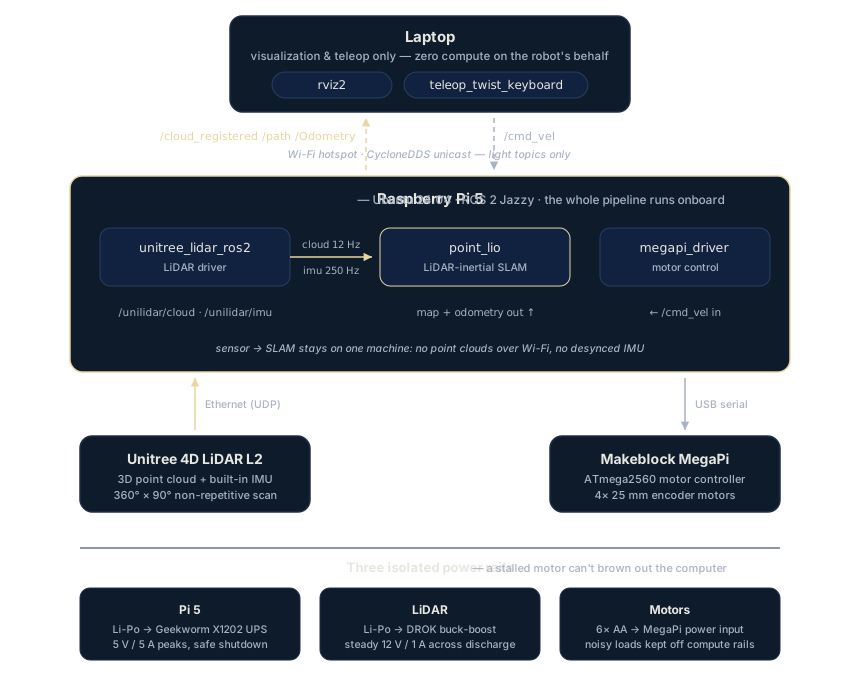
Two decisions define the design:
Sensor and SLAM share one machine. Point-LIO tightly couples LiDAR and IMU streams; separating them from the algorithm with a lossy wireless link corrupts the fusion in ways that look exactly like hardware faults. The laptop subscribes to visualization topics only.
Three isolated power rails. DC motors are electrically noisy and their stall currents cause voltage sag, so they run from their own 6×AA supply — a locked wheel can't brown out the computer. The Pi 5 is picky about power (5 V / 5 A peaks), which the X1202 UPS delivers cleanly. The LiDAR wants a stable 12 V; the DROK buck-boost holds that rail across the Li-Po's whole discharge curve.
Attempt 1: Offboard SLAM over Wi-Fi
Architecture: Raspberry Pi 4 as a thin transmitter — run the LiDAR driver on the Pi, ship raw point clouds and IMU data over the hotspot, run Point-LIO on the laptop. Ubuntu 22.04, ROS 2 Humble on both ends.
Why it seemed reasonable: the Pi 4 is too weak to run SLAM comfortably, and the laptop has plenty of compute. Let DDS handle transport — that's what it's for, right?
Why it failed: a 4D LiDAR at full rate is a firehose, and a consumer hotspot is a straw.
- Packet loss, constantly. Point cloud messages are large; UDP fragments of a single message would drop and the whole message with them.
- DDS tuning didn't save it. Switching to CycloneDDS with unicast peers, tuned fragment sizes (1400 B) and enlarged kernel buffers got stable 12 Hz streaming on a good day — but "usually works" is not a foundation for state estimation.
- Random, unexplainable IMU drift. The nastiest symptom. When point cloud messages arrived late or dropped while IMU messages kept flowing, Point-LIO's time alignment fell apart. The map would suddenly rotate or smear for no visible reason. I spent a long time suspecting the IMU itself before a gyro diagnostic script proved the sensor was healthy — the transport was lying to the algorithm.
- Network saturation. The hotspot was fully occupied by sensor traffic, so even teleop commands got laggy.
The decisive experiment: plugging the LiDAR directly into the laptop via Ethernet made the position jumps disappear. The lesson — don't separate a tightly-coupled LIO pipeline from its sensor with a lossy link. Ship results (poses, registered clouds for viewing), not raw ingredients.
Attempt 2: Onboard SLAM on the Pi 5
Architecture: upgrade to a Raspberry Pi 5 (8 GB) and run everything — LiDAR driver, Point-LIO, motor driver — on the rover itself. The laptop only runs RViz and teleop.
Three consequences followed immediately:
- Forced OS upgrade. The Pi 5 doesn't support Ubuntu 22.04, so the stack moved to Ubuntu 24.04 — and with it ROS 2 Humble → Jazzy, and GCC 11 → GCC 13. Much of the driver ecosystem for this hardware was written against the older toolchain, which produced a cascade of build failures documented below.
- The laptop had to upgrade too. Humble ↔ Jazzy cross-distro DDS communication is officially unsupported — Iron added a type-hash mechanism Humble doesn't understand, so a Jazzy publisher and Humble subscriber can see each other in
ros2 topic listyet exchange no data. The laptop got a clean Ubuntu 24.04 + Jazzy install to match. - RViz couldn't stay on the Pi. Rendering dense point clouds is real graphical work; the Pi heated up alarmingly fast, throttled, and starved the SLAM node. Visualization moved to the laptop, and this time the network carries only topics a human wants to look at, at a rate a hotspot can handle.
The final division of labor:
| Machine | Runs |
|---|---|
| Raspberry Pi 5 | unitree_lidar_ros2 driver, point_lio SLAM, megapi_driver motor node |
| Laptop | RViz2, teleop_twist_keyboard |
This works. Maps are consistent, the IMU drift from attempt 1 is gone entirely, and the network is quiet.
Software Setup
The SLAM stack is dfloreaa's point_lio_ros2 port of Point-LIO — Unitree's officially supported algorithm for the L2, tuned for its non-repetitive scan pattern and low-speed robots. It's lidar-inertial odometry with a rolling local map: front-end SLAM only, no loop closure or pose-graph backend. Target platform: Raspberry Pi 5, Ubuntu 24.04, ROS 2 Jazzy.
1. OS and ROS 2
Flash Ubuntu 24.04 (the server image is enough — the Pi runs headless) and install ROS 2 Jazzy via the current ros2-apt-source package method from the installation docs. Source it in your shell profile:
echo "source /opt/ros/jazzy/setup.bash" >> ~/.bashrcIf apt complains about a libzstd1 version mismatch on arm64 (a known Jazzy packaging bug), downgrade it first: sudo apt install libzstd1=1.5.5+dfsg2-2build1 --allow-downgrades.
2. Livox-SDK2
Even though the sensor is a Unitree L2 and not a Livox unit, point_lio_ros2 depends on livox_ros_driver2 for its message definitions, which in turn needs Livox-SDK2 installed system-wide:
git clone https://github.com/Livox-SDK/Livox-SDK2.git ~/Livox-SDK2
cd ~/Livox-SDK2 && mkdir build && cd build
cmake .. && make -j2
sudo make install
sudo ldconfig
Three things matter here on the Pi 5 / Ubuntu 24.04 combo: the build will fail out of the box under GCC 13 (fix in deep-dive #2), the trailing sudo ldconfig is not optional (deep-dive #3), and it's make -j2, not -j4 (deep-dive #4).
3. Workspace: drivers + SLAM
mkdir -p ~/ros2_ws/src && cd ~/ros2_ws/src

# Unitree L2 ROS 2 driver — note: unilidar_sdk2, NOT unilidar_sdk
# (the upstream README's cd path has a typo)
git clone https://github.com/unitreerobotics/unilidar_sdk2.git

# Livox ROS driver (build dependency of point_lio_ros2)
git clone https://github.com/Livox-SDK/livox_ros_driver2.git

# Point-LIO for ROS 2
git clone https://github.com/dfloreaa/point_lio_ros2.git

# Custom MegaPi motor driver
git clone https://github.com/Manixh-S/megapi_driver.git

cd ~/ros2_ws
colcon build --symlink-install --parallel-workers 2 --cmake-args -DCMAKE_BUILD_TYPE=Release
If CMake can't find PCL (Could not find PCL), install the system headers — on 24.04, ros-jazzy-pcl-ros doesn't always pull them in: sudo apt install libpcl-dev. CMake policy warnings (CMP0144, CMP0148, CMP0074) from the Point-LIO build are harmless.
4. Configure Point-LIO for the L2
The fork ships a pre-tuned unilidar_l2.yaml and a dedicated mapping_unilidar_l2.launch.py, so there's less to do than you'd fear. What I verified and corrected against the real sensor:
- Topics:
/unilidar/cloud(~12 Hz, SensorDataQoS) and/unilidar/imu(250 Hz). These are the only two inputs Point-LIO consumes. imu_time_inte: 0.004— 1/250, matching the measured IMU rate, not the datasheet's.acc_norm: 9.81— the L2 reports acceleration in m/s², not g.- Extrinsics: the IMU-to-LiDAR transform is supplied directly in the YAML. Point-LIO produces TF rather than consuming it — it needs no external TF tree, and it owns the odometry transform while running. Don't run anything else (like a wheel-odometry EKF) that claims the same transform.
5. Launch
On the Pi:
# Terminal 1 — LiDAR driver
ros2 launch unitree_lidar_ros2 launch.py

# Terminal 2 — SLAM
ros2 launch point_lio mapping_unilidar_l2.launch.py

# Terminal 3 — motor driver
ros2 run megapi_driver run_motor_driver
On the laptop (same network, same ROS_DOMAIN_ID):
rviz2   # Fixed Frame: unilidar_imu_initial — see deep-dive #6
ros2 run teleop_twist_keyboard teleop_twist_keyboard
Once SLAM is live you should see /cloud_registered (the map, ~10 Hz), /path (trajectory), and /Odometry appear.
Networking: Two Machines, One Hotspot
Wi-Fi hotspots handle multicast badly — access points drop multicast frames, and DDS discovery relies on them by default. The reliable recipe:
Force CycloneDDS into pure unicast. Each machine's XML config lists the other machine as an explicit peer, pins its own Wi-Fi interface, and sets AllowMulticast to false. MaxMessageSize (65500 B) and a raised WhcHigh watermark keep the visualization PointCloud2 samples flowing without stalls. On both machines:
export RMW_IMPLEMENTATION=rmw_cyclonedds_cpp
export CYCLONEDDS_URI=file://$HOME/cyclonedds.xml
export ROS_DOMAIN_ID=42
Synchronize clocks. The Pi has no RTC. If the two system clocks differ by more than a fraction of a second, RViz throws TF extrapolation errors and renders nothing. chrony fixes it:
sudo apt install -y chrony
sudo systemctl enable --now chrony
chronyc tracking   # confirm a small offset
Smoke-test discovery before touching SLAM. ros2 run demo_nodes_cpp talker on the Pi, listener on the laptop. If you don't see "I heard: Hello World", fix that first — no amount of SLAM debugging will help.
First Launch: Hold Still
Point-LIO calibrates the IMU during the first 10–15 seconds after launch. If the rover moves — or even vibrates from running motors — during that window, the gravity estimate is wrong and the map is permanently tilted. Startup ritual: motors off, hands off, launch, wait for init to complete, then drive.
Troubleshooting Deep-Dives
Everything that meaningfully broke, in symptom → root cause → fix format. Roughly in the order you'd hit them: hardware and toolchain first, then transport, then SLAM behavior.
1. Pi 5 onboard Ethernet drops LiDAR packets
Symptom: the LiDAR is powered, spinning, and responsive, the ROS 2 workspace builds cleanly — but no sensor data ever reaches the application. tcpdump shows zero inbound packets while the interface's drop counters climb.
Diagnostic trail: the RX ring buffer was starved at 512 descriptors (max 8192) with ~6.8 million rx_resource_errors — resizing with ethtool -G eth0 rx 8192 helped the starvation but not the data. A NetworkManager "split-brain" (wired connection toggled off in GNOME while ip addr add was used manually underneath) kept bouncing the interface and resetting the ring. Fixing that didn't help either. The breakthrough: running the bare SDK example made the LiDAR audibly slow down and restart when the work-mode command was sent — proving the outbound path worked and isolating the fault to the inbound receive path.
Root cause: a known open Raspberry Pi kernel bug (raspberrypi/linux #6855) in the RP1 chip's Ethernet driver — likely EEE (Energy Efficient Ethernet) mishandling causing RX loss. Toggling EEE via ethtool returns "Operation not supported."
Fix: bypass the onboard NIC entirely. A USB-to-Ethernet adapter gives the LiDAR its own clean, dedicated interface with a static IP. This is why the adapter is in the parts list.
2. Livox-SDK2 won't build on Ubuntu 24.04 / GCC 13
Symptom: cmake .. && make fails partway through with errors like:
error: 'uint8_t' in namespace 'std' does not name a type; did you mean 'wint_t'?
error: 'uint64_t' does not name a type
note: 'uint64_t' is defined in header '<cstdint>'; did you forget to '#include <cstdint>'?
The errors first appear in sdk_core/comm/define.h; fix that one and they reappear in sdk_core/logger_handler/file_manager.h, and then in other headers — whack-a-mole.
Root cause: GCC 13 (Ubuntu 24.04's default) no longer transitively includes <cstdint> through other standard headers the way GCC 11 (Ubuntu 22.04) did. Code using fixed-width integer types without explicitly including <cstdint> compiled fine on the Pi 4 toolchain and breaks on the Pi 5 one. This is not a Livox-specific bug — it's a general consequence of tightened header hygiene in newer GCC, and it bites many older C++ projects on 24.04.
Fix: add #include <cstdint> to every file that uses fixed-width int types but doesn't include it — in one pass instead of chasing the compiler:
# List affected files (uses fixed-width int types, missing the include)
grep -rlE "uint(8|16|32|64)_t" ~/Livox-SDK2/sdk_core/ \
  | grep -E "\.(h|hpp|cpp)$" \
  | while read f; do
      grep -q "#include <cstdint>" "$f" || echo "$f"
    done

# Patch them: insert #include <cstdint> before the first existing #include
grep -rlE "uint(8|16|32|64)_t" ~/Livox-SDK2/sdk_core/ \
  | grep -E "\.(h|hpp|cpp)$" \
  | while read f; do
      grep -q "#include <cstdint>" "$f" || \
        sed -i '0,/#include/s//#include <cstdint>\n#include/' "$f"
    done
Then clean rebuild (rm -rf ~/Livox-SDK2/build/*, cmake .. && make -j2, sudo make install, sudo ldconfig).
3. Could not find LIVOX_LIDAR_SDK_LIBRARY
Symptom: Livox-SDK2 builds and installs fine, but the later colcon build of livox_ros_driver2 fails with Could not find LIVOX_LIDAR_SDK_LIBRARY.
Root cause: sudo make install places liblivox_lidar_sdk_shared.so in /usr/local/lib, but the dynamic linker's cache doesn't know about it yet.
Fix: sudo ldconfig after installing the SDK.
4. OOM kills during parallel builds
Symptom: make -j4 or a default colcon build dies partway through heavy C++ translation units; dmesg shows the kernel OOM killer taking out cc1plus.
Root cause: four parallel C++ compile jobs can exhaust even 8 GB of RAM on template-heavy files.
Fix: cap parallelism — make -j2 for plain CMake builds, colcon build --parallel-workers 2 for the workspace. Slower, but it finishes.
5. Streaming point clouds over Wi-Fi doesn't work
Symptom: with SLAM on the laptop and the sensor on the rover (attempt 1): dropped point cloud messages, network saturation, and — most confusingly — random IMU-drift-like behavior in the SLAM output that looked exactly like a failing sensor.
Root cause: raw 4D LiDAR output exceeds what a consumer hotspot reliably carries over UDP. Large messages fragment; one lost fragment discards the whole message. Small IMU messages keep arriving, so the tightly-coupled filter receives desynchronized streams and its state estimate drifts. The "IMU problem" was a transport problem wearing a disguise.
Attempted mitigations that weren't enough: CycloneDDS unicast, 1400 B fragment size, net.core.rmem_max maxed out, tuned message sizes. Each helped marginally; none made it dependable.
Fix: architectural, not parametric — run SLAM on the same machine as the sensor and send only visualization topics over the network.
6. No transform from base_link to camera_init
Symptom: RViz reports a missing transform to camera_init and the point cloud never populates — even though Point-LIO is visibly running.
Root cause: this Point-LIO fork does not publish the standard camera_init → body tree the upstream docs imply. It publishes unilidar_imu_initial → unilidar_imu → unilidar_lidar. The world frame is unilidar_imu_initial. On top of that, my static base_link → unilidar_lidar transform created a TF single-parent violation — both the static publisher and Point-LIO claimed to be unilidar_lidar's parent.
Fix: set RViz's Fixed Frame to unilidar_imu_initial. For the parent conflict, invert the static transform to unilidar_lidar → base_link, giving one clean chain. The static transform itself encodes the physical mount — in my case the L2 sits 14.5 cm forward of the rover's center and 24.5 cm above the floor, with a yaw matching the cable orientation. Get that yaw wrong and the whole map is rotated by exactly that amount.
7. Phantom trajectory drift while parked
Symptom: RViz shows the green /path wandering off even though the rover is parked with motors off.
Root cause: IMU initialization not performed while truly stationary, and/or a wrong cable-orientation yaw in the static mount transform rotating the IMU readings.
Fix: restart Point-LIO with the rover absolutely still and wait 15+ seconds (see above); verify the mount yaw matches the actual cable orientation.
8. The same room mapped in three places
Symptom: jumpy localization, and the map contains the same room duplicated in two or three offset locations.
Root cause: LiDAR-vs-IMU clock mismatch. The launch log showed first lidar time 15.8306 — a small, monotonic-looking number — while IMU stamps were full Unix epoch time. The Pi has no RTC, which makes mixed time bases easy to create and hard to spot.
Fix: run the driver with use_system_timestamp:=false so both streams use the L2's internal hardware clock, giving one consistent time base.
9. Circular smearing and position jumps
Symptom: two overlapping problems — (a) sudden position jumps, (b) circular/rotational smearing artifacts in the cloud. The most stubborn issue in the whole project; IMU health, stationary init, and zombie processes were all investigated and ruled out (a QoS-matched gyro diagnostic confirmed the IMU was fine).
Root cause(s): two at once, which is why it resisted diagnosis. Wi-Fi packet loss (dropped DDS fragments) caused the position jumps — moving the LiDAR to a wired connection eliminated them. And the test room had mirrors: reflective surfaces create phantom point returns that break scan registration, causing the rotational smearing. Moving to a mirror-free room eliminated that.
Fix / takeaway: wire the sensor path, and suspect the environment before the algorithm. LiDAR will always struggle near glass, mirrors, and polished metal. (Because both variables changed together, honorable mention to the scientific method — attribution would have needed a wired test in the mirror room.)
10. Point clouds vanish from RViz over time
Symptom: the map appears, then fades away as you watch.
Root cause: the bundled RViz config sets the PointCloud2 Decay Time to 30 s.
Fix: set Decay Time to something large (e.g. 1000) to keep accumulated points visible.
11. RViz on the Pi: thermal throttling
Symptom: running RViz directly on the Pi 5, the SoC temperature climbs fast, the Pi throttles, and SLAM performance degrades with it.
Root cause: rendering dense point clouds is heavy GPU/CPU work on top of an already busy SLAM pipeline. The Pi 5 can run Point-LIO or pretty pictures, not both.
Fix: the Pi runs headless; RViz lives on the laptop. GPU rendering happens where the GPU is.
12. MegaPi restarts under full throttle
Symptom: commanding full speed from teleop makes the MegaPi brown out and restart mid-drive.
Root cause: a step change from zero to full PWM makes four DC motors demand near-stall inrush current simultaneously, tripping the MegaPi's current limit.
Fix: in the custom motor driver, slew-rate limiting ramps commands toward the target instead of jumping, and a configurable speed cap keeps steady-state draw within budget. Details below.
Custom MegaPi ROS 2 Driver
There was no ROS 2 driver for the Makeblock MegaPi, so I wrote one: Manixh-S/megapi_driver (MIT-licensed). It's a Python node that turns geometry_msgs/Twist on /cmd_vel into per-wheel commands over USB serial, so any standard source works — teleop_twist_keyboard today, Nav2 later.
ros2 run megapi_driver run_motor_driverWhat it does:
- Skid-steer kinematics for the 4-wheel encoder-motor base, mapping twist to per-wheel speed commands.
- Slew-rate limiting on motor commands — the fix for deep-dive #12. Commands ramp toward the target instead of stepping, keeping inrush current under the MegaPi's limit.
- Command timeout failsafe — motors stop if
/cmd_velgoes stale (default 0.5 s), so a dropped teleop connection can't send the rover into a wall. - A dedicated hardware worker thread owns all MegaPi serial timing. Encoder deltas and their elapsed wall-clock time are accumulated together, so velocity is computed against the time base the counts were actually measured over — not the ROS loop period, since the two clocks aren't in lockstep.
- Wheel odometry with honest covariances. It publishes
odom(and optionally theodom → base_linkTF), with x/y trusted moderately and yaw covariance pinned high — on a skid-steer base, turning is wheel slip, so heading belongs to the IMU/SLAM stack. After sign calibration, a 1-meter straight-line test reported x = 1.005 m with 2.6 mm lateral drift. - Live-tunable parameters (wheel radius, track width, gains, rates) via
ros2 param set.
Two hard-won implementation notes, for anyone wrapping the MegaPi Python library in ROS 2: the library pickles encoder callbacks through a multiprocessing Manager, so callbacks must be module-level named functions — closures aren't picklable. And its serial layer installs a SIGINT handler, which raises when called off the main thread; the driver wraps signal.signal so that install becomes a no-op.
For pure lidar-inertial mapping, wheel-odometry TF is disabled (publish_tf:=false) — Point-LIO owns the transform tree, and it maps fine on LiDAR + IMU alone. The encoders will earn their keep when Nav2 enters the picture.
Results
The current state: stable real-time mapping onboard the Pi 5, teleoperated driving with no brownouts, and clean visualization on the laptop. The IMU drift that plagued attempt 1 has not reappeared since moving SLAM onboard.
Roadmap: Autonomous Room-Scanning
The goal beyond mapping: a rover that scans a whole room by itself while avoiding obstacles. That's four layers stacked on the odometry that already works, and the plan is to verify each layer before adding the next:
- Teleop (done) — the MegaPi node proves the twist-to-wheels math.
- Flatten the cloud —
pointcloud_to_laserscanslices the L2's 3D cloud into a 2DLaserScanat a chosen height; Nav2 plans on a 2D occupancy grid, not raw 3D points. - Nav2 with manual goals — global + local planners, costmaps, recovery behaviors. Obstacle avoidance isn't a separate module; it's what the local costmap and controller do once the scan feeds them. The Regulated Pure Pursuit controller tolerates skid-steer slip well.
- slam_toolbox in async mapping mode, consuming Point-LIO's odometry plus the flattened scan to produce the persistent 2D grid and
mapframe Nav2 needs. - Frontier exploration —
explore_lite(them-explore-ros2port) watches the map and firesNavigateToPosegoals until no frontiers remain. Autonomy is just one more node sending the goals I was clicking by hand.
One reality check from profiling: Point-LIO plus Nav2 plus slam_toolbox saturates all four of the Pi 5's cores. The likely concession is running the live loop on slam_toolbox alone and reserving Point-LIO for offline processing of recorded bags — or accepting that the Pi eventually hands the job to something with more headroom.
Lessons Learned
- Config must match measured reality, not datasheets. The IMU publishes 250 Hz (not 500) in m/s² (not g).
ros2 topic hzand live data outrank documentation. - Transport is a first-class failure mode. Dropped DDS fragments produce symptoms that impersonate broken sensors. If a tightly-coupled filter misbehaves, audit the data path before the hardware.
- The environment can gaslight you. Mirrors and glass create phantom returns that wreck scan registration. Suspect the room before the algorithm.
- Newer toolchains break old C++. GCC 13 dropped transitive
<cstdint>includes; budget time for patching vendor SDKs when jumping OS versions. - Known kernel bugs are real bugs. The Pi 5's RP1 Ethernet RX loss wasn't a config mistake, and no amount of
ethtoolwas going to fix it. Sometimes the answer is a $12 adapter. - Match ROS 2 distros across machines. Humble ↔ Jazzy DDS looks like it works (
topic listshows everything) while exchanging nothing. - Skid-steer heading lies. Turning is slip; pin yaw covariance high and let the IMU own heading.
- Stage the build. Teleop → scan → Nav2 → mapping → exploration, verifying each layer, beats wiring up a black box and praying.
Building something similar? The parts list plus the troubleshooting section above should save you the weeks I spent finding all of this out the hard way. The motor driver is on GitHub — reach out if you get stuck.